2026 Top Types of Monitor Screens for Global Buyers

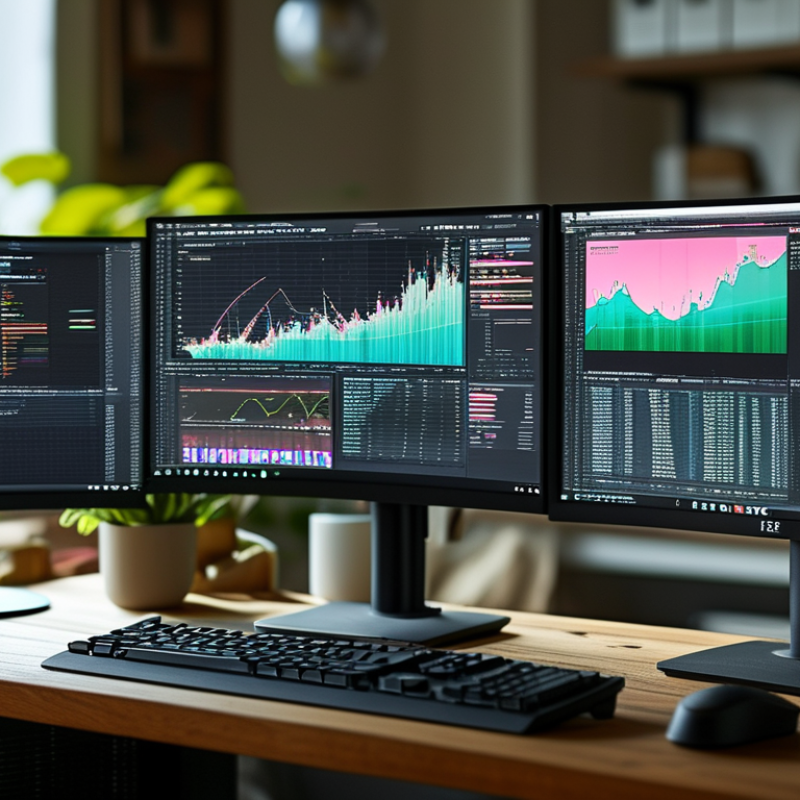
Choosing the right Monitor Screens in 2026 requires more than comparing size, resolution, and price. Global buyers must consider how each screen performs in real working environments. A graphic designer may need accurate colors and wide viewing angles. A financial analyst may value sharp text, low glare, and stable brightness. A logistics office may prioritize durability, simple maintenance, and energy efficiency.

Dr. Raymond Soneira, founder of DisplayMate Technologies, once stated, “The display is the most important component of a smartphone.” His point also applies to professional monitors. The screen is where decisions, designs, measurements, and conversations become visible. Small weaknesses can become daily problems. Reflections can hide details near a window. Poor ergonomics can make a large monitor uncomfortable. Impressive specifications may not guarantee useful performance.

This guide examines the top types of Monitor Screens available to global buyers in 2026. It covers IPS, OLED, Mini-LED, VA, TN, curved, ultrawide, portable, and specialized professional displays. Each category has strengths, limitations, and suitable applications. OLED can deliver deep blacks, but long static images may require careful usage. Mini-LED offers strong brightness, though its backlight complexity may affect uniformity. IPS remains dependable, yet some models cannot match OLED contrast.

There is no perfect screen.

Buyer priorities differ by region, workplace, budget, and support availability. A lower-cost model may be practical, but warranty coverage and replacement access deserve equal attention. This overview uses technical knowledge, market experience, and cautious comparison to help buyers make better-informed decisions. Some recommendations may still need adjustment as panel technology evolves.

2026 Top Types of Monitor Screens for Global Buyers

Monitor Screen Types by Display Technology

2026 Top Types of Monitor Screens for Global Buyers

Monitor Screen Types by Display Technology

LCD monitors remain the most practical choice for offices, schools, and general home use. Their LED backlights keep prices moderate and power consumption manageable. IPS panels produce consistent colors when viewed from the side. They suit design work, editing, and shared workspaces. TN panels can deliver very fast motion response, but their narrow viewing angles look dated. VA panels create deeper blacks and stronger contrast. Dark scenes appear more convincing.

OLED screens control each pixel independently. This produces near-perfect blacks, rapid response, and strong contrast in dim rooms. They can, however, show image retention after prolonged static use. Bright office interfaces may require careful settings. Mini-LED monitors use many small backlight zones behind an LCD layer. They can reach high brightness and improve HDR highlights. Yet, bright objects may create halos around dark areas.

Choose by working conditions, not specification sheets alone. A buyer comparing models should check measured brightness, contrast, color coverage, refresh rate, and response behavior. A 165 Hz screen may feel smooth, but only with suitable graphics hardware. For spreadsheets, stable text clarity may matter more than extreme refresh speed. I have found that showroom brightness can mislead buyers. Real rooms are less dramatic. No panel wins every test. Personal preference still matters. Viewing distance, daylight, and daily screen habits can change the right decision.

How Monitor Panels Differ in Image Quality and Performance

Monitor panels shape the viewing experience more than screen size alone. IPS panels usually deliver accurate colors and wide viewing angles. They suit design work, office dashboards, and shared viewing. VA panels produce deeper blacks and stronger contrast. Dark scenes look richer, though motion can show mild smearing. TN panels remain responsive and affordable. Their weaker color depth and viewing angles can limit professional use.

OLED panels offer nearly instant pixel response and true blacks. Each pixel controls its own light, so contrast appears exceptionally clean. However, long static images may create uneven wear over time. Careful settings and varied content can reduce that concern. Mini-LED screens use many local dimming zones behind an LCD layer. They can reach high brightness for HDR scenes, but bright objects may show a halo against black backgrounds. The result depends on zone count and software control.

Look beyond advertised refresh rates. Check measured response time, brightness, contrast, color coverage, and viewing-angle stability. A 240Hz panel may feel smooth, but only with suitable hardware and fast content. For spreadsheets, text clarity and uniform backlighting often matter more. For competitive games, motion handling deserves closer inspection. I have found that factory color modes can look attractive but remain inaccurate. That trade-off matters. Room lighting also changes perceived contrast. Compare screens in your actual workspace, not only in a brightly lit showroom. No panel wins every test.

Screen Sizes, Resolutions, and Aspect Ratios for Global Buyers

In 2026, monitor selection begins with practical screen dimensions, not fashionable specifications. A 24-inch display suits compact desks and routine office work. A 27-inch screen offers more workspace for spreadsheets, design tools, and research. Larger 32-inch models can reduce window switching, but they need deeper desks and careful viewing distance.

Resolution should match screen size and working distance. Full HD remains useful on smaller panels and budget-focused installations. QHD provides sharper text on 27-inch screens without demanding excessive graphics power. 4K delivers fine detail for editing, technical drawings, and large data tables. However, tiny interface elements may frustrate users. Software scaling is not always consistent.

Aspect ratio also changes daily workflow. The familiar 16:9 format supports general business, video, and training content. Ultrawide formats place several windows side by side, which helps analysts and developers. Vertical displays are valuable for documents, coding, and long webpages. They can feel awkward for shared presentations. Physical testing matters. A specification sheet cannot reveal glare from a nearby window, unstable stands, or uncomfortable text size. Global buyers should compare pixel density, available inputs, ergonomic adjustment, and local service terms. Power standards and language settings also deserve attention. One overlooked detail can affect an entire office.

The safest decision is not always the highest resolution. It is the screen that fits the user, desk, software, and operating environment. Recheck those assumptions before ordering.

Monitor Features for Work, Gaming, Design, and Specialized Use

2026 Top Types of Monitor Screens for Global Buyers

Monitor Features for Work, Gaming, Design, and Specialized Use

Choosing a monitor begins with daily tasks, not impressive specifications alone. Office users often benefit from sharp text, adjustable stands, and comfortable brightness. A 27-inch screen can support documents, spreadsheets, and video meetings without feeling cramped. For wider workflows, an ultrawide display reduces window switching and keeps timelines visible. However, curved screens may not suit every desk or viewing distance.

Gaming monitors need fast response times, high refresh rates, and adaptive synchronization. These features can make movement appear smoother during quick scenes. Designers should examine color accuracy, wide color coverage, and factory calibration records. A bright screen helps with detailed images, but excessive brightness can cause fatigue. Specialized users may need high pixel density, touch input, medical imaging support, or reliable multi-screen control. My testing experience shows that specifications can look excellent, yet real comfort still depends on lighting and posture.

Tips: Compare measured performance with manufacturer claims. Check ports, warranty terms, stand movement, and power use before buying. View sample text at normal distance. No screen is perfect. Some buyers overvalue refresh rate and overlook ergonomics. That mistake is easy to repeat.

2026 Top Types of Monitor Screens for Global Buyers - Monitor Features for Work, Gaming, Design, and Specialized Use

A practical comparison of common monitor display technologies and formats. Specifications are typical market ranges and may vary by model, size, resolution, and regional configuration.

Monitor Screen Type Core Display Technology Typical Size Range Common Resolution Options Typical Refresh Rate Color and Image Characteristics Typical HDR Capability Best-Fit Applications Main Advantages Key Limitations Buyer Selection Priority
IPS LCD Liquid-crystal display with in-plane switching and LED backlighting 23.8–32 inches 1920×1080; 2560×1440; 3840×2160 60–360 Hz Wide viewing angles and generally consistent color across the screen; modern versions can cover sRGB, DCI-P3, or Adobe RGB color spaces. Entry-level to advanced; performance depends heavily on peak brightness, local dimming, and calibration. Office work Design General gaming Balanced image quality, broad product availability, good text clarity, and low risk of permanent image retention. Lower native contrast than VA or OLED; IPS glow can be visible in dark scenes, especially from an angle. Choose for an all-purpose monitor where viewing angles, color consistency, and text readability matter.
Fast IPS LCD High-speed IPS LCD optimized for reduced pixel response time 24–32 inches 1920×1080; 2560×1440; 3840×2160 144–360 Hz Good motion clarity with wide viewing angles; color quality is usually stronger than traditional TN panels. Usually basic or mid-level HDR; many products rely on edge lighting rather than full-array local dimming. Competitive gaming Esports Mixed use High refresh rates, fast response, and a strong balance between motion performance and image quality. Contrast is typically moderate; overdrive settings may create overshoot or inverse ghosting at some refresh rates. Prioritize measured response performance, motion tests, adaptive-sync support, and refresh rate rather than headline specifications alone.
VA LCD Liquid-crystal display with vertically aligned liquid crystals and LED backlighting 24–43 inches 1920×1080; 2560×1440; 3840×2160 60–240 Hz High native contrast, producing deeper blacks than most standard IPS and TN panels; viewing angles are adequate but not usually class-leading. Basic to advanced; high-contrast VA panels can benefit from local dimming, although dark-scene blooming may occur. Movies Productivity Immersive gaming Strong contrast, attractive dark-scene performance, and good value at large sizes and ultrawide formats. Some panels show dark-level smearing; color and brightness may shift more noticeably when viewed off-axis. Select a model with independently measured response times if fast gaming is important.
TN LCD Twisted-nematic liquid-crystal display with LED backlighting 24–27 inches 1920×1080; 2560×1440 144–500 Hz Fast motion response is possible, but viewing angles and color consistency are generally weaker than IPS, VA, and OLED. Usually limited; HDR claims may be constrained by panel contrast and backlight brightness. Competitive esports Budget gaming Very high refresh-rate availability, low input latency, and often competitive pricing. Narrower viewing angles, weaker contrast, and less consistent color reproduction reduce suitability for design work. Consider only when maximum motion speed and price are more important than image quality.
OLED Self-emissive organic light-emitting diode pixels without a conventional backlight 27–49 inches 2560×1440; 3840×2160; 5120×1440 120–480 Hz Per-pixel illumination provides near-infinite perceived contrast, very deep blacks, wide color gamuts, and exceptionally fast pixel transitions. Often advanced, with strong black levels; real-world HDR impact depends on sustained brightness and screen size. Premium gaming HDR entertainment Creative preview Excellent motion clarity, outstanding contrast, wide color capability, and thin panel designs. Potential image retention or burn-in with prolonged static content; brightness can vary with screen area and power management. Review warranty terms, burn-in protection, static-content usage, brightness behavior, and text rendering before purchase.
Mini-LED LCD LCD panel using a dense array of small LED backlight zones; commonly paired with IPS or VA panels 27–49 inches 2560×1440; 3840×2160; 5120×1440 60–240 Hz High brightness and improved contrast over conventional LCD; image quality depends on zone count, panel type, and local-dimming algorithm. Mid-level to advanced HDR, with higher peak brightness than many edge-lit displays. HDR gaming Video production Bright rooms High luminance, strong HDR potential, and lower long-term burn-in concern than OLED for static desktop use. Blooming or haloing around bright objects can occur; local dimming behavior varies substantially between products. Check the number of dimming zones, sustained brightness, black-level performance, and HDR test results.
Ultrawide LCD Wide-format IPS or VA LCD, commonly using a 21:9 or 32:9 aspect ratio 29–49 inches 2560×1080; 3440×1440; 5120×1440 60–240 Hz Provides a broad horizontal workspace or panoramic gaming view; image characteristics depend on whether the underlying panel is IPS or VA. Basic to advanced, depending on panel type and backlight design. Multitasking Simulation gaming Video editing Replaces multiple displays for many workflows, reduces bezel interruption, and supports wide timelines and side-by-side windows. Requires substantial desk width; some applications and games may not fully support the aspect ratio. Confirm desk depth, graphics-card capability, port bandwidth, window-management needs, and software compatibility.
4K UHD Productivity Monitor High-pixel-density IPS, VA, OLED, or Mini-LED LCD with 3840×2160 resolution 27–43 inches 3840×2160 60–240 Hz Sharp text and detailed images; color and contrast vary according to the underlying panel technology. Basic to advanced, depending on panel and backlight. Office work CAD Photo editing Content creation High workspace density, fine text rendering, and strong suitability for detailed documents and visual assets. Higher GPU and interface bandwidth requirements; operating-system scaling may be needed on smaller screen sizes. Check pixel density, scaling behavior, USB-C power delivery, and the required graphics output standard.
Professional Color Monitor Color-focused IPS, OLED, or advanced LCD with factory calibration and a wide-gamut backlight 24–32 inches 2560×1440; 3840×2160 60–165 Hz Designed for accurate color reproduction, stable uniformity, 10-bit workflow support, and broad coverage of standards such as sRGB, DCI-P3, or Adobe RGB. Varies; HDR reference capability requires controlled brightness, contrast, and local-dimming performance. Graphic design Photography Print production Color grading Better calibration controls, color management, uniformity, and repeatable image output than general-purpose monitors. Usually costs more; wide-gamut modes can appear oversaturated in applications without color management. Verify measured Delta E, gamut coverage, uniformity, calibration reports, hardware calibration support, and color-management compatibility.
Portable USB-C Monitor Compact IPS LCD, OLED, or similar panel with USB-C video and power connectivity 13–18 inches 1920×1080; 2560×1600; 3840×2160 60–144 Hz Designed for portability; brightness, contrast, speakers, and color performance vary widely by thickness and battery requirements. Usually limited; HDR support should be verified rather than assumed from software compatibility. Remote work Travel Laptop extension Field service Lightweight second-screen capability, simple cable setup, and flexible use in temporary workspaces. Limited brightness and adjustability are common; some USB-C ports support power or data but not video output. Confirm USB-C DisplayPort Alt Mode, power requirements, included cables, stand stability, and operating-system compatibility.
Touchscreen Monitor LCD or OLED panel with a projected-capacitive or other touch-sensing layer 10–32 inches 1920×1080; 2560×1440; 3840×2160 60–165 Hz Image quality depends on the underlying panel; the touch layer may add reflections or reduce optical clarity. Basic to advanced, depending on the display and backlight. Point-of-sale Industrial control Interactive training Creative input Direct interaction, intuitive navigation, and reduced dependence on a separate mouse or keyboard in specialized workflows. Fingerprints, glare, cleaning requirements, and operating-system or application touch support can affect usability. Check touch-point count, glove or stylus support, surface treatment, installation method, and continuous-use durability.
E-Ink Monitor Reflective electrophoretic display that uses ambient light rather than a conventional backlight 10–25 inches Typically 1600×1200 to 3200×1800; monochrome and color versions are available Usually below conventional LCD gaming rates Paper-like appearance with low glare and low power use; grayscale or color transitions are slower and less vivid than LCD or OLED. Not generally intended for conventional HDR viewing. Long-form reading Coding Low-glare offices Accessibility-focused use Comfortable static reading, very low glare in suitable lighting, and reduced eye-catching backlight flicker. Slow refresh, ghosting, limited video suitability, and dependence on ambient light for the best appearance. Evaluate refresh behavior, front-light quality, color mode, operating-system compatibility, and the intended reading environment.
Specification note: Refresh rate, response time, brightness, contrast, HDR performance, color gamut, ports, and power delivery are model-specific. Buyers should compare independent measurements and confirm regional power, connectivity, warranty, and compliance requirements before procurement.

How to Compare Monitor Types for Different Markets and Budgets

Choosing a monitor type starts with the buyer’s work, not a fashionable specification. IPS panels offer balanced color and viewing angles for offices, design work, and shared classrooms. VA panels usually provide deeper blacks, making them useful for entertainment and contrast-heavy content. TN panels remain a budget option for fast competitive play, but their viewing angles and color quality are limited. OLED delivers excellent contrast and motion clarity, while mini-LED improves brightness through many local dimming zones. Each choice has trade-offs.

For price-sensitive markets, a reliable IPS or VA screen may outperform a cheaper model with excessive features. In professional markets, buyers should compare color coverage, factory calibration, resolution, and warranty support. A 24-inch Full HD screen suits basic office tasks. A 27-inch 1440p model gives spreadsheets and design tools more working space. Gamers should check refresh rate, response behavior, adaptive synchronization, and input lag under real testing. High refresh numbers can mislead when pixel transitions remain slow. Room lighting matters too.

Bright retail environments may favor high-nit panels, whereas dark rooms benefit from stronger black levels and controlled glare. For global purchasing, confirm plug standards, voltage compatibility, language settings, dead-pixel policies, and replacement lead times before ordering. I have found that a modest screen with adjustable height often improves daily comfort more than a larger panel. This is easy to underestimate. Measurements can also vary between units, so independent tests deserve more weight than package claims. The best monitor type is rarely universal; it depends on workload, room, service access, and honest budget limits.

Our offices

Axtel Poland (HQ)
Mokotów Box 16 Woloska St
02-675 Warsaw Poland

tel. (+48 22) 490 96 00
fax: (+48 22) 540 15 22
sale@officeveigl.com

Axtel Middle East & Asia
G-026, THUB 2
Dubai Silicon Oasis
Dubai United Arab Emirates

tel. +971 50 5540 902
sale@officeveigl.com

Axtel India Private Limited
Unit # S-2, Srinivasa Apartments,
16, 1st Cross, Doctors Layout, Kasturinagar,
Bengaluru, Karnataka, India

tel. +91 96865 46376
sale@officeveigl.com

Axtel Benelux
Microlab Kastanjelaan 400
5616 LZ Eindhoven The Netherlands

+31 629 796 453
sale@officeveigl.com