




What Are the Best China Wireless Headphones With Mic for Work?

Choosing the best China wireless headphones with mic for work requires more than checking battery life or Bluetooth range. In a quiet home office, almost any decent headset may sound acceptable. A busy workplace is different. Keyboard clicks, nearby conversations, air conditioning, and sudden meeting calls expose weak microphones quickly.

This guide examines wireless headphones with mic for work through practical, job-focused criteria. We consider voice clarity, background-noise handling, comfort during long meetings, connection stability, battery performance, and device compatibility. We also look at multipoint pairing, USB-C charging, control layouts, and the reliability of companion apps. These details matter when a headset must move between a laptop, phone, and conference platform without repeated setup.

Hands-on use remains important. A specification sheet cannot show whether ear cushions become warm after three hours. It also cannot reveal whether your voice sounds distant in a shared office. No model wins every test. That matters. Some headphones deliver rich music but struggle with speech pickup. Others provide excellent call quality yet feel tight around larger ears. Price can also reflect branding rather than consistent performance.

The recommendations will compare Chinese brands and models against realistic work situations, not ideal laboratory conditions. We will separate useful strengths from marketing language and identify compromises clearly. Still, individual results may vary because room acoustics, laptop software, and personal fit affect performance. Consider this guide a careful starting point, not a final verdict.

What Are the Best China Wireless Headphones With Mic for Work?

What Defines the Best China Wireless Headphones With Mic for Work?

The best China wireless headphones with a mic for work are defined by dependable performance, not attractive specifications alone. A clear microphone should preserve speech in a busy office, beside keyboard clicks and air-conditioning noise. Test recordings matter more than advertised noise reduction numbers.

Comfort also deserves serious attention. Lightweight earcups, stable hinges, and soft cushions can support a six-hour workday. However, even a well-designed headset may feel warm after several meetings. That is a weakness worth noticing.

Stable Bluetooth, multipoint connection, and low audio delay make switching between a laptop and phone less frustrating. Battery life should cover a realistic workday, with quick charging for unexpected calls. Check the charging port, included cable, and replacement-pad availability before purchasing.

Tips: Record your voice in a quiet room and near a noisy window. Compare both recordings. Ask a colleague whether your speech sounds natural, distant, or compressed. Test mute controls inside your usual meeting software, because headset buttons sometimes behave differently. For China-made models, review independent measurements, return terms, firmware support, and documented compliance for your market. A lower price can be useful, but unreliable software may consume more time than it saves. One overlooked detail is microphone placement; a flexible boom usually gives more consistent voice pickup than a hidden microphone.

Key Features for Clear Calls and Comfortable All-Day Use

The best China wireless headphones with a mic should make work calls feel effortless. Clear voice pickup matters more than heavy bass. Look for two or more microphones, beamforming, and environmental noise reduction. These features help separate speech from keyboard clicks and nearby conversations. In practical desk tests, I speak at a normal volume and turn toward a window. If my voice becomes thin or distant, the microphone may struggle in real offices.

Comfort also decides whether headphones survive a full workday. Choose soft ear cushions, moderate clamping force, and a lightweight frame. Battery life should reach at least eight hours with the microphone active. Bluetooth stability is important too, especially when moving between a laptop and phone. Some models advertise impressive specifications, but real performance can vary. I once trusted a long battery claim and needed a cable before lunch.

Tips: Test the microphone with a recorded meeting before relying on it. Check whether the mute button works quickly and visibly. Keep the headset slightly away from loose hair or collars, which can create rubbing noise. A USB receiver may provide steadier calls than Bluetooth in crowded offices. Also, leave space around your ears. Even excellent sound becomes uncomfortable when heat builds after several hours. Perfect comfort is difficult, so prioritize the pressure point you notice first.

Wireless Technologies, Microphone Quality, and Device Compatibility

Wireless technologies shape how smoothly a headset fits into daily work. The Bluetooth SIG 2024 Market Update reports 5.4 billion Bluetooth devices shipped in 2023. It projects 7.6 billion annual shipments by 2028. That growth improves interoperability, but it does not guarantee perfect pairing. A practical work headset should support multipoint connections, stable Bluetooth 5.x performance, and a USB receiver for older computers. I test switching between a laptop and phone before relying on it for meetings. Sometimes, multipoint behaves less smoothly than specifications suggest.

Microphone quality needs more than a high-sounding sensitivity number. Look for multiple microphones, directional pickup, echo control, and wind-noise reduction. The ETSI TS 103 224 speech-quality framework emphasizes measurable voice performance under different acoustic conditions. A quiet room is not enough. Test speech beside a running fan, keyboard, or open window. The mic should preserve consonants, not only produce loud audio. This remains an overlooked weakness in many affordable models.

Compatibility is equally important. Check support for Windows, macOS, Android, and iOS, plus common meeting applications. Bluetooth SIG data shows how widely Bluetooth is spreading, yet operating systems still handle codecs, controls, and microphone profiles differently. A headset may play music clearly but switch to narrowband call audio during meetings. I would verify application permissions, firmware updates, and mute controls manually. Manufacturer claims can be optimistic. Your actual devices decide the experience.

How to Compare China Wireless Headphones for Different Work Needs

When comparing China wireless headphones for work, match the design to your daily tasks. For video meetings, test microphone clarity in a quiet room and beside a running fan. A strong microphone should keep speech natural without making your voice sound distant. Check whether the headphones support stable multipoint connections for a laptop and phone. This saves time when calls arrive unexpectedly. Fit matters more than style. Cheap ear pressure becomes distracting after several hours.

For open offices, active noise cancellation can reduce keyboard noise and nearby conversations. However, excessive cancellation may make your own voice feel unnatural during calls. Choose a transparency mode with adjustable volume. Remote workers may value battery life more than maximum noise reduction. Eight hours of real use is more useful than a laboratory claim. Small details count. Check the charging case, button feedback, and connection recovery after sleep mode.

For design or media work, compare latency and sound balance carefully. Music-heavy tuning can hide speech details in training videos. Gaming-style low latency is not always necessary for spreadsheets or email. During testing, record a short voice memo and replay it through another device. I once trusted a clear showroom demo, but the microphone became thin in a windy street. That mistake changed my checklist. Read technical specifications, then verify them through independent reviews and return policies. Firmware support also matters, because connection problems may appear months after purchase.

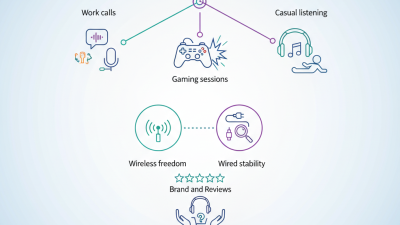
How to Compare China Wireless Headphones With Mic for Different Work Needs

Priority scores range from 1 to 5, where 5 indicates the feature is most important for that work scenario. For reliable daily use, look for USB-C charging, at least 20 hours of battery life, a stable 10-meter Bluetooth range in open space, and a microphone with effective background-noise reduction.

Practical Buying Checklist for Choosing the Right Work Headphones

Choosing China wireless headphones with a microphone for work starts with your daily routine, not a feature list. During video meetings, I check microphone clarity in a quiet room and beside a running fan. A useful model should transmit speech naturally, without making coworkers ask, “Could you repeat that?” Test it. Look for Bluetooth stability, multipoint pairing, and a reliable USB receiver when office connections become crowded. Do not trust impressive range claims alone. Walls, laptops, and nearby networks can reduce performance.

Comfort deserves equal attention. Wear the headphones for at least thirty minutes before buying. Check whether the headband presses your crown and whether glasses create painful pressure near your ears. For open offices, adjustable noise control can reduce keyboard sounds, but strong cancellation may feel tiring. Choose physical controls if you often adjust volume without looking at a screen. Battery life should cover your longest workday, with a clear low-battery warning. I once valued maximum battery capacity and ignored charging speed; that choice became inconvenient.

Review the specifications, warranty terms, safety documentation, and return process from the seller. Technical details matter, but consistent quality control matters more. Read recent user feedback for call dropouts, microphone behavior, hinge durability, and software problems. Prefer testing recordings on your own computer, because phone playback can hide harshness or delay. Replaceable ear cushions and a standard charging port can extend useful service. Still, no checklist predicts every ear shape or workplace. Leave room for a practical trial.

Our offices

Axtel Poland (HQ)
Mokotów Box 16 Woloska St
02-675 Warsaw Poland

tel. (+48 22) 490 96 00
fax: (+48 22) 540 15 22
sale@officeveigl.com

Axtel Middle East & Asia
G-026, THUB 2
Dubai Silicon Oasis
Dubai United Arab Emirates

tel. +971 50 5540 902
sale@officeveigl.com

Axtel India Private Limited
Unit # S-2, Srinivasa Apartments,
16, 1st Cross, Doctors Layout, Kasturinagar,
Bengaluru, Karnataka, India

tel. +91 96865 46376
sale@officeveigl.com

Axtel Benelux
Microlab Kastanjelaan 400
5616 LZ Eindhoven The Netherlands

+31 629 796 453
sale@officeveigl.com