10 Best Work From Home Headset Tips for Buyers?

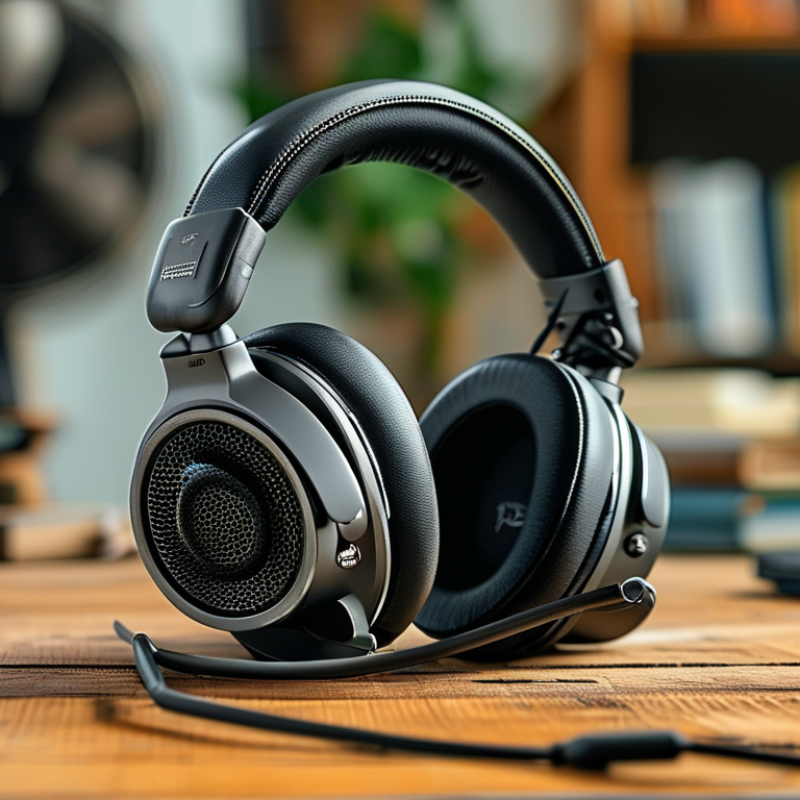
Choosing a work from home headset is not simply a matter of picking the most expensive model. Your desk, room acoustics, call schedule, and listening habits all affect the right choice. A headset that sounds excellent in a quiet study may struggle beside a washing machine or a barking dog.

Audiologist and hearing researcher Dr. Brian Fligor has repeatedly stressed the importance of listening level and exposure time. His practical warning is worth remembering: “Louder is not better.” That idea should guide every buying decision, especially when daily meetings last for several hours. A comfortable fit, clear microphone, dependable connection, and effective noise control can protect both productivity and patience.

Small details matter. Notice whether the ear cushions become warm after thirty minutes. Test the microphone near a running fan. Check if your voice sounds natural during a trial call. Wireless convenience is useful, but battery anxiety can interrupt an important presentation. Wired models are less glamorous, yet sometimes more reliable.

There is no perfect headset.

This guide, “10 Best Work From Home Headset Tips for Buyers,” examines the practical choices behind a confident purchase. It considers comfort, microphone quality, audio balance, connectivity, durability, privacy, and hearing safety. Some recommendations may seem obvious, but real working conditions expose weaknesses quickly. I have also included points that deserve reflection, because advertised features do not always improve everyday calls. The best work from home headset is not necessarily the loudest or newest. It is the one that remains comfortable, clear, and dependable throughout your actual workday.

10 Best Work From Home Headset Tips for Buyers?

How to Identify Your Work-From-Home Headset Requirements

How to Identify Your Work-From-Home Headset Requirements

A headset should match your room, schedule, and communication habits. Start by measuring your real workspace. A quiet study needs less noise isolation than a kitchen beside a washing machine. In the 2024 State of Remote Work report, Buffer found that 98% of surveyed workers wanted remote work at least sometimes. Your headset may become a daily tool, not an occasional accessory.

I once treated microphone clarity as the only buying criterion. That shortcut was wrong. During a three-hour meeting, tight ear cushions and a heavy headband became distracting. Comfort matters because Microsoft’s 2022 Work Trend Index reported that 53% of employees were more likely to prioritize health and wellbeing than before the pandemic. Choose breathable padding, adjustable pressure, and controls you can operate without looking. Test the microphone from your normal seat, especially if your voice passes near a fan or open window. Too much noise cancellation can also feel unnatural. This deserves a personal test.

For frequent calls, compare microphone pickup, sidetone, and background-noise handling. For shared rooms, wireless range and quick mute access may matter more than premium audio detail. Check battery life against your longest workday, then allow charging time. The U.S. National Institute for Occupational Safety and Health recommends controlling workplace noise exposure, so avoid uncomfortable volume levels. A useful trial is simple: record one meeting, walk briefly away from your desk, and listen for speech dropouts, echo, or pressure points.

10 Best Work From Home Headset Tips for Buyers? - How to Identify Your Work-From-Home Headset Requirements

No. Requirement to Check Recommended Target or Specification Why It Matters at Home Buyer Verification Tip
1 Connection Type Choose USB for simple computer calls, 3.5 mm for broad device compatibility, or wireless for freedom of movement. The connection determines compatibility, setup time, and whether an adapter may be required. Check compatibility with the computer, phone, docking station, and meeting software before buying.
2 Microphone Noise Control Look for a directional microphone, acoustic noise reduction, and a physical mute control. A directional microphone can reduce unwanted room sounds and make speech clearer during calls. Test the microphone near a keyboard, fan, or household conversation and listen to a recording.
3 Speaker and Voice Clarity Prioritize clear midrange speech reproduction, balanced volume, and low distortion rather than excessive bass. Most work calls depend on intelligible speech, not entertainment-focused sound effects. Listen to several voices and check whether words remain distinct at a comfortable volume.
4 Comfort for Long Sessions Seek adjustable headbands, soft ear cushions, even clamping pressure, and a design suitable for extended wear. Poor fit can cause pressure, heat, or ear fatigue during long meetings and work sessions. Wear the headset for at least 30 minutes and check for pressure around the ears and top of the head.
5 Active Noise Cancellation Consider ANC for steady low-frequency noise, such as air conditioners or traffic; do not treat it as a complete soundproofing solution. ANC is generally more effective against continuous low sounds than sudden voices or sharp household noises. Test ANC with the actual background noise in your workspace and compare comfort with ANC enabled.
6 Battery Life for Wireless Models Target at least 15–20 hours of practical talk or listening time, with USB charging and a usable wired backup when possible. A longer battery cycle reduces interruptions during full workdays and travel between rooms. Review battery figures for active calling, because talk time may be lower than music playback time.
7 Wireless Range and Stability Select a model with stable coverage for the distance between your desk and common household areas; 10–15 metres is a useful reference for many indoor setups. Walls, furniture, wireless congestion, and device placement can reduce the advertised range. Test movement around your home rather than relying only on the maximum range stated in specifications.
8 Controls and Call Features Look for accessible volume controls, call answer/end functions, a reliable mute button, and a microphone boom that mutes when raised if needed. Physical controls help prevent mistakes when switching between speaking, listening, and muting. Confirm that controls work with your operating system and preferred conferencing applications.
9 Privacy and Sound Leakage Choose closed-back earcups when nearby people may hear meeting audio, while keeping listening volume at a safe, comfortable level. Closed earcups can reduce outward leakage and help limit distractions in shared spaces. Play speech at your normal level and ask someone nearby whether audio is audible outside the earcups.
10 Durability, Warranty, and Replacement Parts Prefer replaceable ear cushions, reinforced cable or hinges, clear warranty terms, and readily available accessories. Work headsets may be used daily, so repairability and after-sales support affect long-term value. Check the warranty period, return window, spare-cushion availability, and charging or connection requirements.
Quick buying rule: For frequent online meetings, prioritize microphone clarity, comfort, connection reliability, and easy mute controls before advanced audio features.

How to Choose Between Wired and Wireless Headset Designs

A work-from-home headset should match your room, routine, and tolerance for small annoyances.

Wired and wireless designs both perform well, but they solve different problems.

A wired headset usually delivers stable audio without charging delays.

It suits long meetings, shared offices, and users who dislike connection pairing. During testing, I noticed that a cable can reduce interruptions. However, it may catch on a desk edge or pull when you stand. Check the cable length, connector type, and microphone position before buying. A flexible boom microphone should stay near your mouth without touching your cheek. Clear voice pickup matters more than exaggerated bass.

Wireless headsets create a cleaner workspace.

They help when you move between a desk, printer, and kitchen. Look for dependable battery life, a comfortable charging method, and a strong connection through ordinary walls. A headset lasting eight hours may sound sufficient, but frequent meetings and forgotten charging can expose that weakness. I once chose convenience over battery capacity and regretted it during an afternoon interview. Wireless models can also add slight audio delay or pairing confusion. These issues are uncommon, yet they deserve consideration.

For either design, prioritize soft ear cushions, adjustable pressure, and physical mute controls.

Test the headset for at least thirty minutes if possible. Comfort often changes after the first hour. Noise cancellation can help with traffic or nearby conversations, but it cannot replace a quiet workspace. Your ideal choice may be less impressive on paper. It should simply remain reliable during an ordinary, imperfect workday.

How to Evaluate Microphone and Sound Quality

How to Evaluate Microphone and Sound Quality

A work-from-home headset should make your voice sound natural, not metallic or distant. Microsoft’s 2023 Work Trend Index surveyed 31,000 people across 31 markets. It found that 68% lacked uninterrupted focus time. Clear audio cannot fix every meeting problem, but it can reduce repeated questions and listening fatigue.

Test the microphone before buying. Record your voice from 30 centimeters away, then repeat near a keyboard or running fan. Listen for clipped words, harsh “s” sounds, and sudden volume changes. Background-noise reduction should remove steady noise without cutting your sentence endings. Ask a colleague to judge the recording. Your own ears may miss problems.

Sound quality also needs practical testing. Play speech, not only music. Voices should remain clear at low volume, with enough warmth to avoid thin, tiring sound. The ITU-T P.800 standard uses Mean Opinion Score methods to evaluate perceived voice quality, but consumer product pages rarely provide comparable scores. That is a weakness worth noticing. Battery life and connection stability matter during long calls, too. Gartner reported that hybrid work remained common among knowledge workers in 2023, making dependable audio more than a comfort feature. Try the headset for two hours. Pressure, heat, or slight latency may appear later. Fancy specifications can still disappoint.

How to Check Comfort for Extended Daily Use

A comfortable work-from-home headset should feel almost unnoticed after several hours. Comfort depends on more than soft padding. Check the headset’s weight, headband pressure, ear-cup depth, and adjustment range before buying. A model that feels comfortable for ten minutes may become painful by lunchtime.

Tip: Test the fit while wearing your usual glasses. The arms can create pressure beneath the ear cushions. Move your head, bend forward, and speak naturally. The headset should stay secure without needing constant adjustment. I once preferred a very light model, but its narrow headband caused a dull ache after two meetings. That experience changed how I judge comfort.

Tip: Look for breathable ear cushions and enough space around your ears. Closed cushions can trap heat during long calls, especially in warm rooms. Try wearing the headset for at least thirty minutes before deciding. Check for sweating, pinching, or scalp pressure. A rotating ear cup may help when you shift positions, but extra movement can reduce stability. Remember to remove the headset briefly between calls. Small breaks matter. Comfort testing is not perfectly objective, and my own tolerance varies with sleep, stress, and room temperature. Still, recording discomfort after each trial gives buyers more reliable evidence than a quick first impression.

How to Compare Compatibility, Features, and Overall Value

Choosing a work-from-home headset requires more than checking its microphone rating. Compatibility comes first. Confirm whether it supports your computer’s operating system, meeting software, and connection type. USB, wireless, and 3.5mm options behave differently. A headset may connect successfully yet lose call controls or microphone access. Test those functions before trusting the purchase.

I compare voice clarity in a quiet room and beside a running fan. The microphone should reduce background noise without making speech sound thin. Comfort matters during a three-hour meeting, not just a five-minute trial. Check the ear cushion pressure, headband adjustment, cable length, and mute control. Wireless models need realistic battery estimates, charging time, and a stable connection. Small details matter.

I once chose a lighter headset and ignored its stiff headband. It looked practical, but my ears hurt by afternoon. That mistake changed how I judge value. Price should reflect daily comfort, repair support, included accessories, and expected durability. A cheaper model is not better if its cable fails quickly. A premium model is not automatically wiser. Read independent user reports, examine the return policy, and compare the features you will actually use. Leave room for doubt. Your workspace may expose weaknesses that a product page hides.

Our offices

Axtel Poland (HQ)
Mokotów Box 16 Woloska St
02-675 Warsaw Poland

tel. (+48 22) 490 96 00
fax: (+48 22) 540 15 22
sale@officeveigl.com

Axtel Middle East & Asia
G-026, THUB 2
Dubai Silicon Oasis
Dubai United Arab Emirates

tel. +971 50 5540 902
sale@officeveigl.com

Axtel India Private Limited
Unit # S-2, Srinivasa Apartments,
16, 1st Cross, Doctors Layout, Kasturinagar,
Bengaluru, Karnataka, India

tel. +91 96865 46376
sale@officeveigl.com

Axtel Benelux
Microlab Kastanjelaan 400
5616 LZ Eindhoven The Netherlands

+31 629 796 453
sale@officeveigl.com