



How to Choose the Best Wireless Headset for Business?

Choosing the best wireless headset for business is not simply a matter of selecting the newest model. It is about matching audio performance with daily working conditions. A sales representative may need strong microphone noise reduction in a busy café. An accountant may value comfort during long spreadsheet sessions. A manager working from home may prioritize reliable switching between a laptop and phone. Small differences become obvious after several hours. Pressure points, delayed sound, or a weak battery can quietly reduce productivity.

Holger Reisinger, a workplace communication expert at Jabra, has said, “The future of work is hybrid.” That observation matters when evaluating a wireless headset. Business users now move between offices, homes, airports, and shared meeting rooms. A suitable device should offer stable Bluetooth performance, clear voice pickup, simple controls, and dependable battery life. It should also connect easily with platforms such as Microsoft Teams or Zoom. Compatibility must be checked, not assumed.

This guide examines the practical details behind a confident purchase. We will compare microphone quality, wearing comfort, wireless range, charging options, security features, and total cost. No model wins every test. Our first shortlist may even be wrong for your team. That is why real workplace habits matter more than attractive specifications. A headset that sounds excellent in a quiet room may fail beside a running printer. The right choice should survive ordinary interruptions, repeated calls, and imperfect working days. Listening carefully to those details leads to a more reliable buying decision.

How to Choose the Best Wireless Headset for Business?

Define Business Needs and Headset Use Cases

Choosing a business headset starts with a work map, not a shopping list. Define who will use it, where, and for which conversations. A customer support agent may need all-day comfort, a clear microphone, and quick mute control. An executive moving between rooms may value wireless range and simple device switching. Remote staff need reliable performance beside keyboards, traffic, or household noise. Ask one practical question: what failure would disrupt the workday most? Short battery life? Poor voice pickup? Limited mobility? These answers create useful priorities.

Match each use case to measurable requirements. For open offices, test noise reduction and microphone clarity during nearby conversations. For shared desks, check charging time, connection stability, and easy pairing. Video meetings require natural voice reproduction, dependable mute behavior, and compatibility with company communication software. Phone-heavy roles may need a comfortable headband for six-hour shifts.

Measure before guessing. A headset that feels light for ten minutes may become tiring by noon. I learned this after treating comfort as a minor feature; it was not.

Set a realistic budget per user, including replacement cushions, charging accessories, and support time. Security also matters: confirm approved wireless standards, firmware controls, and data-handling policies with your IT team. Do not assume the most expensive model fits every role. Run a small pilot with different users and record comments after real calls. One quiet employee may tolerate weak audio, while a busy agent cannot. Early tests can expose uneven performance, though they rarely predict every environment. Leave room to revise the criteria.

Compare Wireless Technologies, Range, and Device Compatibility

Choosing a business headset starts with wireless technology, not appearance. Bluetooth remains practical for laptops and phones. The Bluetooth SIG’s 2024 Market Update forecasts seven billion Bluetooth device shipments annually by 2028. That growth suggests broad compatibility, but not perfect compatibility. Check support for Hands-Free Profile, Advanced Audio Distribution Profile, and multipoint connections. Some computers still handle call controls poorly.

DECT suits fixed office environments requiring longer indoor coverage and stable voice transmission. Typical systems advertise up to 100–150 metres in open space, while walls, elevators, and metal furniture reduce that distance sharply. Bluetooth Class 2 devices often reach about 10 metres; Class 1 can approach 100 metres under ideal conditions. Real offices are less forgiving. A headset tested beside a desk may fail near a meeting room doorway.

Device compatibility deserves a physical test. Confirm USB-C or USB-A receiver support, operating-system compatibility, microphone permissions, and simultaneous phone-and-computer use. The Bluetooth SIG also reports that Bluetooth audio device shipments are expected to grow steadily through 2028, increasing the value of current standards support. Yet newer is not always better. A low-latency 2.4 GHz headset may perform better for softphone calls, while Bluetooth is easier for mobile work. Walk through the actual workspace before buying. Range charts rarely show concrete walls.

Evaluate Comfort, Audio Quality, and Microphone Performance

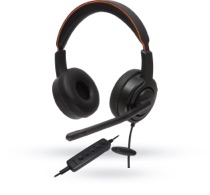
Choosing the best wireless headset for business starts with comfort, audio quality, and microphone performance. During long calls, a heavy headset can create pressure around the ears. Tight headbands may also cause headaches by late afternoon. Look for soft ear cushions, balanced weight, and several adjustment points. Test the headset for at least thirty minutes before buying. A five-minute trial rarely reveals heat or discomfort.

Audio quality should make speech clear without making voices sound artificial. In a busy office, listen for keyboard clicks, nearby conversations, and air-conditioning noise. A useful headset should separate speech from background sounds without removing natural tone. Check whether the controls allow quick volume changes. Low volume can hide words, while excessive bass may make voices muddy. I once preferred a headset with richer sound, but its unclear speech became tiring during technical meetings.

Microphone performance deserves equal attention. Place the microphone near the corner of your mouth, not directly in front of it. Record a short call simulation from a quiet room and a shared workspace. Listen for breath sounds, echo, and sudden volume changes. Noise reduction is helpful, but aggressive processing can cut off the first syllable of words. This happened during one of my tests. It reminded me that advertised features need practical verification. Ask a colleague to judge your voice, since self-monitoring can miss important problems. A reliable business headset should keep your voice steady when you turn your head, take notes, or speak softly.

Assess Battery Life, Connectivity, Security, and Durability

How to Choose the Best Wireless Headset for Business?

Battery claims need practical testing. A headset promising 30 hours may deliver less during calls, noise cancellation, and cold commutes. Test a sample through a full workday, including meetings and standby time. Aim for at least eight hours of realistic talk time. Check charging speed, battery replacement options, and whether the headset warns users before shutdown. Small details matter.

Connectivity should fit the office, not just the product sheet. Bluetooth multipoint can switch between a laptop and phone, while a dedicated USB receiver may reduce pairing problems. The Bluetooth SIG 2024 Market Update forecasts annual Bluetooth device shipments will reach 7.0 billion by 2028. That growth increases choice, but compatibility still requires testing with existing operating systems and meeting software. Walk through a busy office. Listen for dropouts.

Security deserves more attention than it usually receives. The 2024 Data Breach Investigations Report found that the human element appeared in 68% of breaches, including mistakes and social engineering. Select headsets supporting secure pairing, encrypted connections, signed firmware, and centralized updates. Follow NIST Cybersecurity Framework 2.0 principles for asset tracking and access control. Durability is equally concrete: inspect the hinge, microphone arm, ear cushions, and cable joints. Use IEC 60529 IP ratings only for water and dust resistance; they do not prove drop strength. I once trusted a premium-looking hinge too quickly. That assumption failed after repeated daily folding. Test before approving volume purchases.

Review Business Features, Support, and Total Cost of Ownership

A business headset should be judged beyond microphone clarity. Review call controls, background-noise handling, wireless range, battery life, and wearing comfort. Microsoft’s 2023 Work Trend Index found that 62% of meetings were unscheduled. Fast mute controls and dependable pairing therefore matter during sudden calls.

Support can decide the real cost. Check warranty length, firmware policies, replacement batteries, spare-unit availability, and response times. Ask whether support covers user training and device management. Gallup’s State of the Global Workplace 2024 reported that only 23% of employees were engaged globally. A headset cannot create engagement, but poor audio can add daily frustration.

Calculate total cost of ownership over three years: purchase price, accessories, support labor, replacements, charging equipment, and lost time during failures. My own buying mistake was comparing only the invoice price. I ignored support delays.

Tips: Test the headset in a busy room. Record a two-minute call. Walk ten meters from the desk. Check comfort after two hours. Request a trial period for different users. Finance teams should compare cost per working day, not cost per device. IT teams should document firmware updates and return procedures. Keep a small spare pool. It prevents one broken headset from disrupting a client meeting. I still overvalue impressive specifications sometimes. Real users often prefer simpler controls and lighter designs.

Our offices

Axtel Poland (HQ)
Mokotów Box 16 Woloska St
02-675 Warsaw Poland

tel. (+48 22) 490 96 00
fax: (+48 22) 540 15 22
sale@officeveigl.com

Axtel Middle East & Asia
G-026, THUB 2
Dubai Silicon Oasis
Dubai United Arab Emirates

tel. +971 50 5540 902
sale@officeveigl.com

Axtel India Private Limited
Unit # S-2, Srinivasa Apartments,
16, 1st Cross, Doctors Layout, Kasturinagar,
Bengaluru, Karnataka, India

tel. +91 96865 46376
sale@officeveigl.com

Axtel Benelux
Microlab Kastanjelaan 400
5616 LZ Eindhoven The Netherlands

+31 629 796 453
sale@officeveigl.com