How to Choose Wireless Headsets With Microphone?

Choosing wireless headsets with microphone is not simply a matter of comparing prices or counting advertised features. The right model must fit your daily environment, voice habits, devices, and comfort needs. A headset used beside a quiet home desk may fail on a windy train. A gaming headset may deliver powerful sound but feel heavy during a six-hour workday. Small details matter, including microphone placement, ear-cup pressure, Bluetooth stability, battery life, and connection switching.

Dr. Amar Bose, an influential audio engineer and founder of Bose, once said, “The most important thing is to listen.” That principle remains useful when evaluating wireless headsets with microphone. Listen to recorded speech in a busy room. Check whether your voice sounds natural, distant, or compressed. Test the controls with wet or cold hands. Try the headset with your laptop and phone, not just one device. Multipoint support can save time, yet it may behave inconsistently across operating systems. No feature list is perfect.

This guide explains how to compare microphone clarity, comfort, noise control, latency, wireless range, and long-term reliability. It also considers practical evidence, such as user testing, warranty terms, firmware support, and return policies. Some choices involve compromise. Strong noise cancellation can affect microphone performance. A compact design may reduce battery capacity. The “best” headset is rarely universal. It is the one that performs reliably where you actually use it. Even then, expectations should remain realistic. Technology improves, but crowded cafés are still difficult.

How to Choose Wireless Headsets With Microphone?

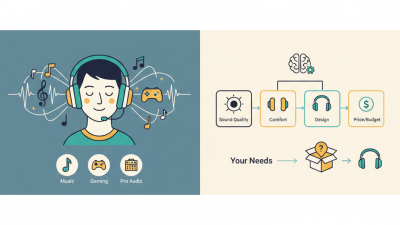
Define Your Main Use and Wireless Listening Priorities

Before choosing a wireless headset, define where and why you will use it. Your main use should control every later decision. An office listener may need clear speech and strong background-noise control. A commuter may value comfort, battery life, and stable connections. Gaming and online meetings can require low delay and an accurate microphone. Write your most common situation. Keep it specific.

Your listening priorities deserve equal attention. If you enjoy detailed music, examine sound balance rather than advertised bass. For calls, test whether your voice remains natural near a running fan. A headset can sound impressive but still transmit room noise. Battery claims also need careful interpretation, because high volume and wireless features reduce operating time. Check charging speed, connection stability, and whether the headset works while charging. Small details matter.

Comfort often decides whether a technically excellent headset stays on your desk. Check clamp pressure, ear-pad heat, weight, and control placement after one hour. A short store test may not reveal discomfort. My own mistake was choosing lighter headphones with a weak microphone. They felt pleasant, yet callers repeatedly asked me to speak closer. That experience changed my priorities. Do not trust specifications alone. Read independent testing, compare measurement methods, and question reviews that provide no usage details. Your needs may change, too. A headset for quiet mornings might fail in a crowded room. Perhaps that is not a product defect, but a poor match between the device and your real listening environment.

Compare Microphone Types, Voice Clarity, and Noise Control

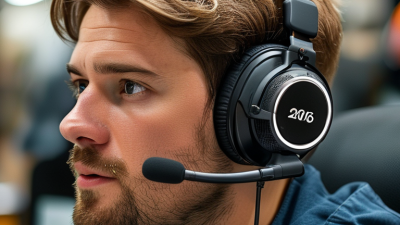
A wireless headset microphone should match the room, not just the product description. A boom microphone usually keeps a stable mouth distance and delivers clearer speech. It works well beside keyboards, open windows, or a busy colleague. Built-in MEMS microphones look cleaner, but beamforming quality varies sharply between models. Bone-conduction microphones can reduce some ambient pickup, yet voices may sound thinner. Room noise wins.

For voice clarity, listen for natural consonants, low delay, and controlled breathing sounds. ITU-T Recommendations P.1100 and P.1110 provide speech-quality testing methods for narrowband and wideband calls. These standards matter more than impressive frequency-range claims. Noise suppression should reduce fans and traffic without cutting word endings. Active noise cancellation mainly protects the listener; it does not automatically improve your transmitted voice. The World Health Organization’s World Report on Hearing (2021) estimates that over 1.5 billion people live with hearing loss, so excessive listening volume deserves attention. Keep playback comfortable and test voice recordings at a normal speaking distance. I still distrust perfect laboratory scores. A headset can sound excellent in a quiet office and fail beside a rattling air conditioner. Test it live.

Check Wireless Range, Connection Standards, and Device Compatibility

When choosing a wireless headset with a microphone, start with range, connection standards, and compatibility. A strong signal matters more than a dramatic specification. In a home office, 10 to 15 meters may be enough. Concrete walls, metal shelving, and crowded Wi-Fi channels can reduce that distance. I have found that advertised range is measured in open space. Real rooms are less forgiving.

Connection standards affect stability and delay. Bluetooth is convenient for phones, tablets, and many laptops. A dedicated USB receiver may provide steadier audio for meetings or gaming. Check supported profiles, codec options, and microphone behavior before buying. Some headsets play sound correctly but use a lower-quality hands-free mode during calls. That detail is easy to miss. Wireless interference remains possible, even with modern standards.

Tips: Test the headset with your actual device before a long meeting. Confirm whether it supports your operating system, console, or smart device. Check USB port type, pairing limits, and permission settings. If two devices must stay connected, look for multipoint support, but verify how it switches between calls. Compatibility lists can be incomplete. User manuals and independent measurements are more trustworthy than marketing claims. I would also record your room’s usual distance and obstacles. A headset that works beside the router may fail at the kitchen table. That small test can expose an expensive mistake.

How to Choose Wireless Headsets With Microphone?

Compare wireless connection standards by their typical maximum operating range.

Range depends on walls, interference, antenna design, and local regulations. Bluetooth Class 2 is widely compatible with phones, tablets, and laptops, while Class 1 can reach farther when both connected devices support it. A 2.4 GHz USB receiver usually requires a USB-A or USB-C adapter but often provides a stable low-latency connection for computers and consoles. DECT offers long range for compatible office or desk-phone systems, but it is generally less suitable for direct mobile-device pairing. Always verify the headset's connector, operating system support, Bluetooth version, and console compatibility before purchasing.

Evaluate Comfort, Battery Life, Controls, and Long-Term Durability

How to Choose Wireless Headsets With Microphone?

Comfort should be tested during a real work session, not just a quick store fitting. I once chose a lightweight headset that felt fine initially, but its tight headband caused pressure after two hours. Look for soft ear cushions, adjustable arms, and balanced weight. Glasses can create extra pressure around the ears. Move your head while wearing it. A stable fit matters during meetings and commuting.

Battery life needs practical measurement. A headset claiming long playback may perform differently with frequent calls, high volume, or wireless interference. Choose enough capacity for several working days, but keep a charging cable nearby. The microphone also deserves careful testing. Record your voice in a quiet room, then repeat near traffic or an air conditioner. Clear speech is more valuable than impressive specifications.

Controls should be easy to find without looking. Physical buttons often work better when walking or wearing gloves, though touch controls can feel faster. This is not always true. Check whether mute status is obvious, especially during group calls. For durability, inspect hinge movement, cushion stitching, charging-port strength, and microphone flexibility. Avoid forcing loose parts. A replaceable cushion can extend useful life, but not every design supports it. I would also read long-term user reports, while remembering that individual habits can distort those opinions.

How to Choose Wireless Headsets With Microphone? - Evaluate Comfort, Battery Life, Controls, and Long-Term Durability
Evaluation Dimension What to Check Recommended Target Why It Matters Warning Signs Overall Importance
Comfort and Fit Headband pressure, ear-cup depth, cushion softness, weight distribution, and adjustability. Comfortable for at least 2–4 hours; padded headband; independently adjustable ear cups; moderate clamping force. A comfortable fit reduces fatigue during meetings, gaming, study, and extended listening. Uneven pressure, exposed hard plastic, shallow ear cups, or a headband that creates a pressure point. Essential
Weight Total headset weight and how evenly it is distributed across the head. Prefer a balanced design; approximately 250–350 g is a practical range for many over-ear models. Lower weight can reduce neck strain, but extremely light construction may sacrifice padding or structural strength. Front-heavy design, loose hinges, or noticeable neck and crown fatigue after short use. High
Battery Life Continuous playback time, microphone usage, charging time, and quick-charge support. At least 20 hours of typical use; 30–50 hours is more convenient for frequent users. Longer battery life reduces charging interruptions and is especially useful for travel and office use. Battery estimates that apply only with lighting or special features disabled; rapid capacity loss over time. Essential
Charging Convenience Charging connector, cable compatibility, charging indicator, and ability to operate while charging. Common USB-C charging, clear battery status, and a quick-charge feature that provides several hours of use. Convenient charging helps prevent downtime and avoids carrying a proprietary cable. Unclear battery indicators, loose charging ports, or no usable wired mode when the battery is empty. High
Wireless Connection Connection stability, operating range, pairing process, and compatibility with computers and mobile devices. Stable connection throughout a typical room; simple pairing; reliable switching between supported devices. A dependable connection prevents interruptions during calls, video playback, and online meetings. Frequent dropouts, delayed reconnection, complex pairing, or inconsistent performance near common wireless devices. Essential
Microphone Quality Speech clarity, background-noise handling, microphone position, and mute functionality. Clear speech in a quiet room and understandable voice transmission in moderate background noise. The microphone determines whether the headset is suitable for meetings, calls, classes, and team communication. Muffled voice, strong keyboard or fan noise, popping sounds, or a microphone that cannot be positioned properly. Essential
Controls Button placement, volume adjustment, play or pause, call controls, mute access, and control feedback. Clearly separated physical controls with tactile feedback and easy access without removing the headset. Intuitive controls make everyday use faster and reduce accidental actions. Unmarked touch controls, accidental presses, confusing button combinations, or no direct mute control. High
Audio Modes Passive isolation, active noise reduction, transparency mode, and mode-switching speed. Choose according to use: passive isolation for simple listening; noise reduction for travel; transparency for awareness. Different listening environments require different levels of isolation and awareness. Noticeable background hiss, unnatural transparency sound, pressure sensation, or limited control over audio modes. Medium–High
Durability Hinge strength, headband flexibility, ear-cup attachment, surface materials, and resistance to daily handling. Reinforced stress points, firm hinges, replaceable cushions where possible, and no creaking during normal adjustment. Durable construction extends service life and reduces the chance of failure at common stress points. Cracking plastic, loose hinges, weak swivel joints, exposed wiring, or cushions that deteriorate quickly. Essential
Maintenance Ease of cleaning, replacement parts, removable ear cushions, and storage protection. Wipe-clean surfaces, replaceable cushions, and a protective case or reliable folding mechanism. Regular cleaning improves hygiene, while replaceable parts can extend the headset’s usable life. Non-replaceable cushions, difficult-to-clean fabric, fragile folding joints, or no safe storage option. Medium–High
Best Use Profile Match the headset’s features to the main activity and expected daily usage. Prioritize comfort for office work, microphone clarity for calls, battery life for travel, and durability for frequent commuting. The best choice depends on how often, where, and for how long the headset will be used. Choosing only by advertised battery life or sound features while ignoring fit, controls, and construction quality. Essential

Balance Audio Features, Microphone Performance, and Overall Cost

How to Choose Wireless Headsets With Microphone?

Balance Audio Features, Microphone Performance, and Overall Cost

Wireless headsets now serve meetings, gaming, commuting, and quiet home recording. Bluetooth SIG’s 2024 Market Update projected 5.4 billion Bluetooth device shipments worldwide. Compatibility is rarely the biggest problem. Battery life, connection stability, and repair cost matter more.

I test headsets in real rooms, not only silent offices. A microphone that sounds clear beside a desk fan can outperform a richer-sounding model. Check voice samples, background-noise handling, and microphone monitoring. The World Health Organization recommends keeping listening below 80 decibels for adults, up to 40 hours weekly. Strong bass is not automatically better. It may hide speech details and encourage louder listening.

The microphone deserves equal budget. A 2024 Buffer State of Remote Work report found that 98% of surveyed workers wanted some remote work. Clear speech reduces repetition during those calls. However, expensive wireless models can still disappoint. Their apps may be confusing, and replacement batteries may be unavailable. That is an uncomfortable cost many reviews ignore.

Tips: Compare total ownership cost, not the sticker price. Measure battery hours with noise cancellation enabled. Test your voice beside a keyboard. Keep the return window. Read independent measurement reports, then listen yourself. Perfect rankings do not exist. Your room changes the result.

Our offices

Axtel Poland (HQ)
Mokotów Box 16 Woloska St
02-675 Warsaw Poland

tel. (+48 22) 490 96 00
fax: (+48 22) 540 15 22
sale@officeveigl.com

Axtel Middle East & Asia
G-026, THUB 2
Dubai Silicon Oasis
Dubai United Arab Emirates

tel. +971 50 5540 902
sale@officeveigl.com

Axtel India Private Limited
Unit # S-2, Srinivasa Apartments,
16, 1st Cross, Doctors Layout, Kasturinagar,
Bengaluru, Karnataka, India

tel. +91 96865 46376
sale@officeveigl.com

Axtel Benelux
Microlab Kastanjelaan 400
5616 LZ Eindhoven The Netherlands

+31 629 796 453
sale@officeveigl.com